New Zealand businesses are seeing phishing campaigns abusing Figma.com this week which host ‘passable’ phishing pages and redirect victims towards Microsoft device authentication phishing infrastructure.
The campaigns are notable because the initial link contained in the phishing email does not necessarily point directly to an obviously malicious website. Instead, victims are directed to a legitimate Figma presentation hosted on Figma’s infrastructure.
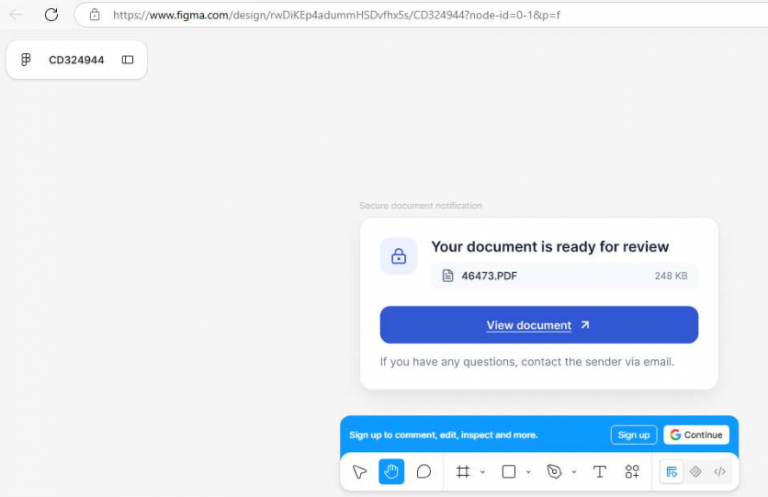
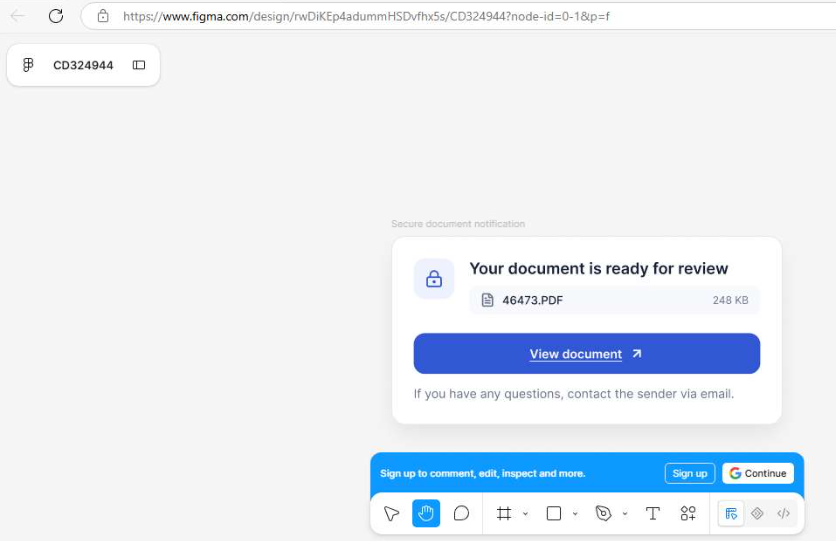
Once opened, the Figma presentation displays what appears to be a document-sharing or file-access webpage. Several variations have been observed, with the presentation designed to look like legitimate document-sharing notifications or access requests.
The objective is to convince the recipient to click through to the next stage of the attack.
Figma Used as the Initial Phishing Infrastructure
The use of Figma provides attackers with a legitimate, trusted domain for the first stage of the attack.
Rather than sending users directly to a suspicious domain, the email contains a link to:
figma.com
The Figma presentation then acts as a landing page, presenting the victim with a document-sharing themed interface and a link to continue.
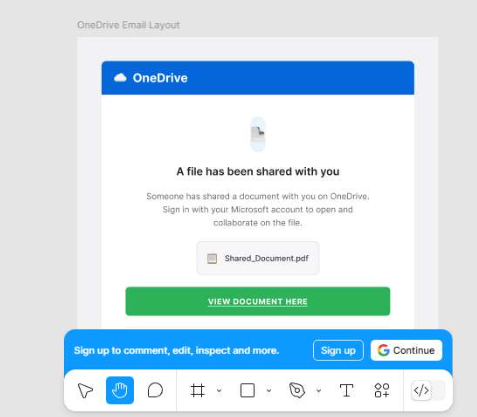
This creates an additional problem for organisations relying heavily on URL reputation or domain-based email filtering. The first URL encountered by the mail gateway can be a legitimate Figma URL, even though the ultimate destination is malicious.
If a user clicks on the link, Figma will have them verify they wish to go to the specific workers.dev URL.
Microsoft Authentication Phishing
The second stage leads the victim towards infrastructure designed to steal Microsoft authentication information.
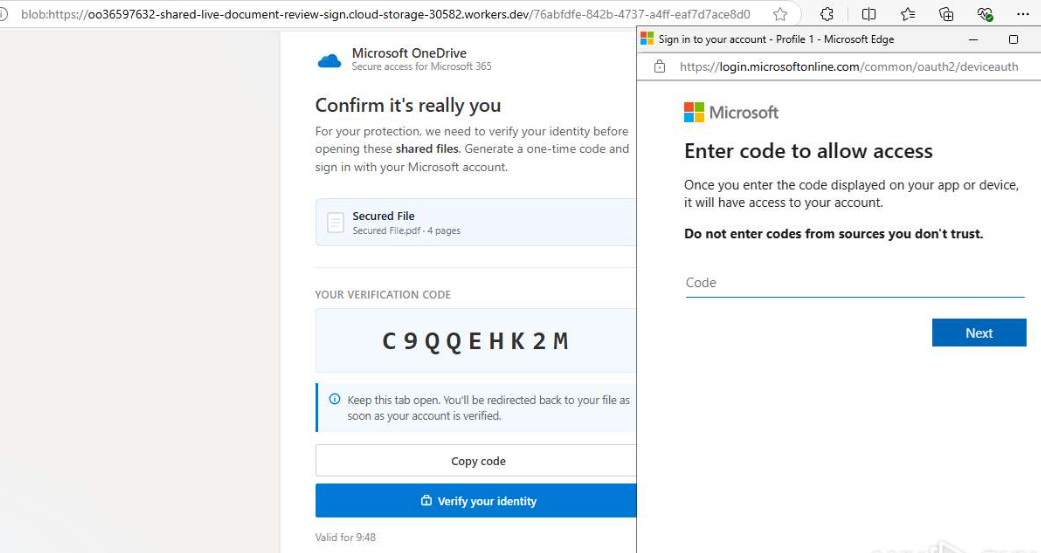
The Microsoft-themed phishing infrastructure observed in these campaigns is typically hosted using Cloudflare Workers, with attackers making use of free workers.dev domains.
This gives the campaign a second layer of legitimacy from the perspective of automated filtering.
The attack chain can therefore look broadly like:
Phishing email → Figma.com presentation → fake document-sharing page → workers.dev phishing infrastructure → Microsoft authentication phishing
The use of legitimate services at the beginning of the attack chain demonstrates why organisations should not automatically treat links to well-known SaaS platforms as safe.
Why This Matters to New Zealand Businesses
Many organisations have become increasingly reliant on cloud services and collaboration platforms, making document-sharing lures particularly effective.
A user may receive what appears to be a normal notification about a shared document, report or business file. The fact that the first link is hosted on Figma.com can also reduce the likelihood that a recipient, email security product or security analyst immediately identifies the message as malicious.
The campaign also highlights a wider problem with trusted infrastructure being abused for phishing.
Blocking every legitimate SaaS platform is obviously not practical. However, organisations should understand which services their users actually require and use that information when determining their defensive controls.
What Organisations Should Do
Organisations should consider the following actions:
1. Search for Figma URLs in incoming email
Check mail gateway, secure email gateway and email security logs for incoming messages containing links to figma.com.
Do not simply search for malicious domains. Look for the trusted-domain component of the attack chain.
Security teams should also investigate historical email traffic to determine whether Figma-hosted phishing links have already reached users.
2. Determine whether Figma is actually required
If an organisation does not use Figma, consider temporarily blocking inbound links to figma.com at the email gateway or security controls.
This should be treated as a risk-based and temporary measure rather than a permanent recommendation for every organisation.
For organisations with no legitimate business requirement for Figma, blocking the service can remove an entire stage of this particular phishing campaign while Figma works to identify and remove malicious presentations.
3. Monitor workers.dev links
Security teams should also look for links to:
workers.dev
The presence of a workers.dev URL is not, by itself, evidence of malicious activity. Cloudflare Workers is a legitimate platform and is widely used for legitimate applications.
However, a workers.dev URL appearing in an unexpected Microsoft authentication, document-sharing or account-verification workflow should receive additional scrutiny.
Again, if your organisation does not require/use workers.dev hosted services then you should blocking this domain permanently as it has been abused in phishing campaigns for a very long time.
4. Look beyond the first URL
Email security controls should consider the complete URL chain rather than only the domain contained in the original email.
A message containing a Figma URL should not automatically be considered safe simply because Figma is a legitimate service.
Where possible, security controls should follow redirects and inspect the destination and page content associated with links.
5. Educate users about document-sharing lures
Users should be reminded that a link to a legitimate website does not necessarily mean the content presented on that website is trustworthy.
Particular caution should be applied when a document-sharing page subsequently asks users to:
- authenticate with Microsoft;
- enter a password;
- approve an authentication request;
- provide MFA information;
- download an unexpected document; or
- access a document they were not expecting.
Trusted Does Not Mean Safe
The increasing abuse of legitimate cloud services is making traditional domain reputation controls less effective.
In this campaign, the attacker does not need the first URL in the email to look malicious. Figma provides the trusted hosting platform, while Cloudflare Workers provides another legitimate service that can be abused to host the next stage.
For New Zealand organisations, the immediate defensive opportunity is to check incoming email for Figma-hosted URLs and understand whether Figma is required by the business.
Where Figma is not used, temporarily blocking Figma links or access may provide a simple way of reducing exposure to this particular campaign while the platform works to identify and remove the malicious content.
As always, controls should be reviewed periodically so that temporary restrictions do not become unnecessary permanent business limitations.