Attackers Increasingly Abuse Google Services to Bypass Email Security Controls
Over the past several weeks, we have observed a significant increase in phishing campaigns leveraging legitimate Google services to evade email security controls and reputation-based filtering.
While abusing trusted cloud platforms is not a new tactic, the volume of these campaigns appears to be increasing. Attackers are taking advantage of the inherent trust many organisations place in domains owned by major technology providers, making it more difficult for traditional email security solutions to distinguish malicious content from legitimate traffic.
How the Attack Works
One common technique involves attackers uploading malicious HTML files to Google-hosted storage services and then embedding links to those files within phishing emails.
For example:
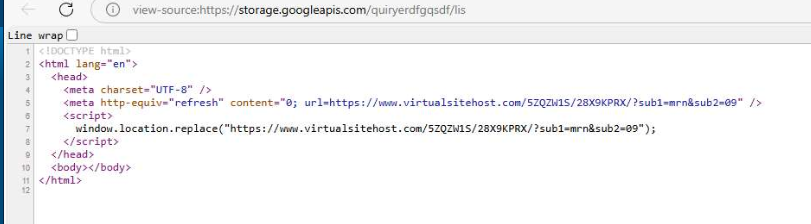
https://storage.googleapis[.]com/quiryerdfgqsdf/lis
At first glance, the URL appears trustworthy because it is hosted on a Google-owned domain. However, the hosted file often contains nothing more than a redirect to a phishing website.
A recent sample contained the following code (URL defanged):
<!DOCTYPE html>
<html lang="en">
  <head>
    <meta charset="UTF-8" />
    <meta http-equiv="refresh" content="0; url=https://www[.]virtualsitehost[.]com/5ZQZW1S/28X9KPRX/?sub1=mrn&sub2=09" />
    <script>
      window.location.replace("https://www[.]virtualsitehost[.]com/5ZQZW1S/28X9KPRX/?sub1=mrn&sub2=09");
    </script>
  </head>
  <body></body>
</html>
The page serves a single purpose: immediately redirecting the victim from a trusted Google domain to an attacker-controlled phishing site.
By using both a meta refresh tag and JavaScript redirect, the attackers maximise the likelihood that the victim’s browser will follow the redirect regardless of browser settings or security controls.
Lure Themes Continue to Evolve
The phishing emails associated with these campaigns use a wide range of subjects designed to attract clicks through urgency, curiosity, health concerns, or account-related warnings.
Examples observed include:
- Banned Footage: The 1987 Brain Reversal Covered Up
- URGENT: Your Shower Head Water Pressure Damages Brain Cells
- Breaking: The 10-Minute Morning Routine Stanford Won’t Publish
- Your Storage Is Full. Protect Your Digital Life.
- Doctors Stunned: 12 Minutes of Sunlight Reverses 5 Years
- Exposed: The Salt-Free Diet Shrinking Your Brain Volume
- Doctors Stunned: 500 Patients Forget Their Dementia Diagnosis
- The Most Important Discovery in History Just Leaked
- Top Doctors Reveal the Truth About Chronic Pain
- Your Account Is 99 Percent Full and Counting. Claim 100GB Free in the Next 8 Minutes.
- This Simple Daily Habit Is Turning Heads in 2026
The diversity of these subject lines suggests that attackers are continuously testing different themes to identify which messages generate the highest engagement rates.
Infrastructure Patterns
The phishing destinations themselves are hosted across a collection of domains that share similar characteristics.
While some domains have existed for over a year, others were registered as recently as a few weeks ago. Many follow a common naming convention consisting of multiple dictionary words combined into a seemingly legitimate domain name.
Examples include:
rockscalelink[.]com
vitalwellbeingguide[.]com
virtualsitehost[.]com
dockprintocean[.]com
hillrollbook[.]com
wheelbatbook[.]com
dockroadbook[.]com
healthyzenpathway[.]com
eyecatcher-design[.]info
wordpowerrake[.]com
affiliateaccesskey[.]com
harborsparkfabricmat[.]com
This naming strategy helps domains appear more legitimate while making them difficult to identify through simple keyword-based detection methods.
Detection Opportunities
One useful detection strategy is to focus on the abuse of trusted cloud-hosting services rather than solely attempting to block individual phishing domains.
Security teams should consider inspecting links pointing to:
- storage.googleapis.com
- apis.google.com
Particular attention should be given to situations where the hosted content is an HTML page that immediately redirects the user elsewhere.
Legitimate organisations using these Google services typically link directly to resources such as:
- Images
- PDF documents
- Software downloads
- Static website content
In contrast, a standalone HTML file whose sole purpose is to redirect users to another domain should be treated as highly suspicious.
Additional indicators that may warrant investigation include:
- Meta refresh redirects
- JavaScript-based redirects
- Recently registered destination domains
- Multiple redirect chains
- Consumer-oriented marketing content leading to credential collection pages
- Google-hosted URLs embedded within unsolicited emails
Final Thoughts
Threat actors continue to exploit the trust associated with major cloud providers to improve phishing success rates. Because domains such as storage.googleapis.com are widely used for legitimate purposes, outright blocking is rarely practical.
Instead, organisations should focus on identifying behavioural indicators associated with abuse, including redirect-only HTML files, unusual redirect chains, and newly registered destination domains.
As email security products become better at identifying traditional phishing infrastructure, attackers are increasingly moving toward trusted platforms to blend in with legitimate traffic. Monitoring for these techniques can provide an additional layer of protection against campaigns that would otherwise bypass reputation-based controls.